Jobie Admin: A Modern Portal Dashboard UI Design
Managing a job portal, hiring platform, or freelancer network involves juggling countless data points—from active applications and candidate profiles to company listings and hiring statistics. A cluttered or outdated admin interface can slow down your workflow and make critical tasks feel unnecessarily complex. The Jobie Admin - Portal Dashboard UI Design template addresses this directly, offering a clean, modern, and highly functional dashboard built for clarity and efficiency.
A Dashboard Designed for Real-World Workflow
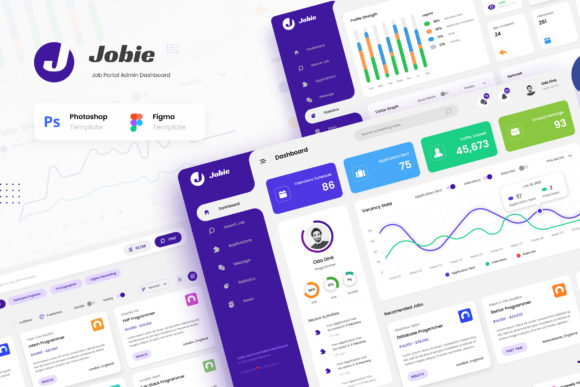
This isn't just a collection of pretty screens. The Jobie Admin template provides six purpose-built views that mirror the actual tasks of a hiring manager or platform administrator. The main Dashboard presents key metrics at a glance—open positions, recent applications, and hiring pipeline status—using clear data visualization and a logical layout. The Search Job page is built for filtering and discovery, while the Applications screen organizes candidate submissions in a manageable, sortable list.
The Profile section allows for detailed user or candidate views, Companies offers a directory of associated businesses, and Statistics turns raw data into actionable insights with charts and graphs. Each screen maintains a consistent visual language: ample white space, a restrained color palette that highlights important actions, and intuitive iconography. This cohesion reduces cognitive load, allowing you to focus on decision-making rather than figuring out the interface.
Practical Applications Beyond the Job Portal
While designed for job-related admin panels, the template's strength lies in its adaptable modern typography and structured layout. The use of a clean, sans serif font throughout ensures excellent readability on screens, which is crucial for dense data dashboards. This typographic choice supports a brand identity that feels professional, trustworthy, and contemporary—qualities essential for any service-based platform.
Consider its utility for a freelancer app admin panel where tracking projects, client communications, and invoices is paramount. Or adapt it for a career app backend where educators manage course enrollments and student progress. The template's design principles—clear visual hierarchy, consistent spacing, and logical component grouping—are universal. They can inform the web design of internal tools for marketing teams, sales CRMs, or even community management platforms. The included design assets in PSD and Figma formats make this adaptation straightforward.
Customization and Integration into Your Project
The template's value is multiplied by its ease of customization. Being built with free Google Fonts and delivered in layered, well-organized PSD and Figma files, it invites modification. You can adjust the color scheme to match your existing brand identity, swap the sans serif font for another typeface that better fits your audience, or rearrange components to emphasize different data points.
This is where understanding font pairing becomes useful. The current clean sans serif pairs well with a subtle serif for headings in reports or with a script font for a more personalized, creative touch in specific modules, like candidate welcome messages. Testing these combinations within the template's framework allows you to see how typographic changes affect the overall feel and readability before committing to development.
Ensuring Professional Results
For entrepreneurs and small business owners building their first hiring platform, using a polished template like Jobie Admin sets a professional tone from day one. It signals to users that you value a smooth, efficient experience. For designers and developers, it serves as a robust starting point, saving weeks of layout and component design work. The included PDF documentation provides clear guidance, ensuring you can leverage every asset effectively.
Remember, the images used in the previews are for demonstration only and are not included. This is standard practice, allowing you to source imagery that perfectly fits your niche—whether it's editorial design photos for a creative agency portal or more corporate headshots for a traditional recruitment firm. The template's strength is its structure and visual hierarchy, which will remain effective regardless of the content you populate it with.
Ultimately, the Jobie Admin - Portal Dashboard UI Design is a tool for building better backend experiences. It combines aesthetic appeal with practical functionality, helping you create an admin interface that is not only beautiful but also genuinely useful for the people who use it every day.