Streamline Your Day with the Workflow Daily Planner
For designers, entrepreneurs, and creators, the chaos of a typical day often drowns out the creative spark. We juggle client briefs, content calendars, administrative tasks, and personal appointments, often feeling like we are constantly reacting rather than strategically moving forward. The solution isn't just about working harder; it's about creating a system that captures your flow. This is where a dedicated Workflow Daily Planner transforms your productivity, turning scattered to-do lists into a cohesive, actionable strategy. It is designed to be more than just a calendar—it is a central hub for your professional and personal life.
The Anatomy of an Effective Workflow
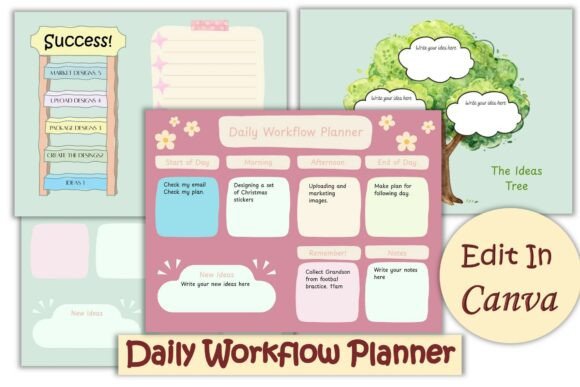
This particular set of four pages is the ideal Workflow Daily Planner to keep you on track, offering a blend of structure and flexibility that rigid apps often lack. The visual personality of this planner is intentionally "cute" yet professional, utilizing a clean layout that prioritizes whitespace and readability. It avoids the clutter of traditional planners, focusing instead on a modern typography approach that feels fresh and inviting. Whether you are a small business owner managing orders or a content creator scripting a video, the aesthetic is designed to reduce cognitive load, making the planning process feel less like a chore and more like a creative ritual.
One of the standout features is the inclusion of a dedicated 'Ideas Tree'. In the world of brand strategy and design, random thoughts are often the seeds of innovation, yet they frequently get lost in the shuffle. This specific section acts as a safe harbor for those fleeting moments of inspiration—be it a new logo design concept, a packaging design tweak, or a social media graphics campaign idea. By integrating this creative space directly into your daily workflow, you bridge the gap between administrative planning and creative ideation, ensuring that no brilliant concept slips through the cracks.
Flexibility for Every Creator and Entrepreneur
The true power of this planner lies in its adaptability. It is easily editable in Canva, which means you are not locked into a static typeface or color scheme. You can organize your daily chores, appointments, and routine either online or by printing them off, catering to both digital natives and those who prefer the tactile experience of pen on paper. This flexibility is crucial for brand consistency. You can edit colors to match your specific brand identity, change the font to reflect your unique voice, and add stickers to personalize the sheets. This level of customization ensures that your planner feels like a natural extension of your brand, rather than a generic tool.
For marketers and publishers, the ability to adjust the layout is invaluable. You might need more space for tracking a specific campaign one week, or a focus on editorial deadlines the next. Because the design is hosted in Canva, it serves as a living design asset. You can duplicate pages, resize sections, and tweak the visual hierarchy to suit the specific demands of your workload. This isn't just a static PDF; it is a dynamic system that grows with your business.
Integrating Design Principles into Daily Planning
When you download this planner, you receive a PDF with a clickable link that takes you directly to the design in Canva. It is a seamless process, provided you are logged into your account. Once inside, you have access to a premium font style that balances readability with personality. The choice of typography here is subtle but effective; it uses clean lines typical of a sans serif font for body text to ensure legibility, perhaps paired with a playful script font or handwritten font for headers to add that "cute" aesthetic without sacrificing professionalism.
This approach to modern typography influences how you perceive your tasks. A well-designed planner reduces the visual friction of a long to-do list. By using clear headings, defined columns, and ample spacing, the layout guides your eye naturally from priority to priority. This is a practical application of editorial design principles applied to personal productivity. When your tools look good and function well, you are psychologically more inclined to use them consistently, which is the key to long-term success in any creative field.
Practical Application Across Industries
Consider how this tool fits into various workflows. For a graphic designer freelancing from home, it acts as a commercial font friendly interface for tracking billable hours and project milestones. For a hobbyist or crafter, it becomes a canvas for planning inventory for a market stall or organizing a new DIY project. The "Ideas Tree" is particularly useful here, allowing you to sketch out a new product line or a web design layout while simultaneously managing your shipping schedule.
The versatility extends to digital and print environments. If you manage a team, you can share the editable Canva link, ensuring everyone is using the same visual system. If you prefer a tangible product, the high-resolution output is perfect for printing. This dual functionality makes it a robust piece of design assets for anyone serious about organizing their creative chaos. It helps in building a consistent routine, which is the foundation of any successful brand identity.
Why This Planner Works for You
Ultimately, the goal of a Workflow Daily Planner is to remove the friction between thinking and doing. By providing a structured yet customizable framework, it allows you to focus on the work that matters. The ability to personalize the aesthetic ensures that the tool remains engaging over time, preventing the "planner fatigue" that causes so many to abandon their organizational systems by February. It respects your time by being immediately functional, yet it respects your creativity by allowing total control over the look and feel. It is a practical, stylish solution for the modern creative professional.